
Roomster® 5M+Downloads
Roomster Corp.Lifestyle
3.38.05K Reviews
- Version
- 1.1.114
- Installs
- 5.00M
- Age Rating
- Everyone
Screenshots
Our Review of Roomster® 5M+Downloads
 Analysis by Appyee
Roommate hunting can turn into a second job: comparing rent, checking whether a room is really available, and trying to tell from a few lines of text whether someone will be comfortable to live with. I find Roomster® most useful as a focused place to bring those searches together. It is a free lifestyle app from Roomster Corp., aimed at people looking for rooms and potential roommates, rather than a general-purpose housing marketplace. Its scale is substantial, with more than five million installs, but a 3.4 average from around 36,000 ratings suggests that the experience is not equally smooth for everyone.
What the app is like now
Roomster’s basic appeal is the combination of finding a place and finding a person to share one with. That matters because a room listing is only half the decision: the household’s routines, expectations, and communication style can make an affordable room either workable or stressful. I’d treat the app as a way to discover and compare leads, not as a substitute for checking the property, terms, and people yourself.
The current Android version is 1.1.088, and the app supports Android 5.0 and later. It is free to install, with in-app purchases listed from $7.99 to $59.99 per item. That range makes it sensible to explore the free experience first and decide whether the available paid options solve a real problem for your search. Roomster is rated for Everyone, though users should still be thoughtful about the personal details they share when arranging housing with strangers.
First Impressions
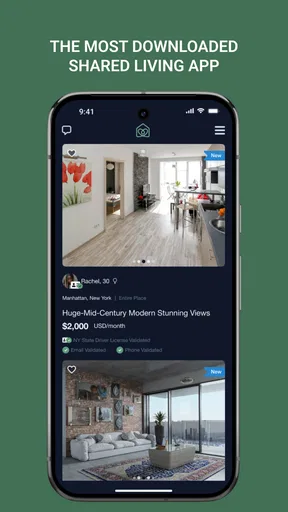
Jumping into Roomster®, the app's design is pretty sleek and user-friendly. It’s got that minimalist vibe that makes navigating a breeze. You’re greeted with a straightforward interface where you can either search for a room or post a listing. I appreciate that it doesn’t bombard you with unnecessary clutter right off the bat.
Setting Up Your Profile
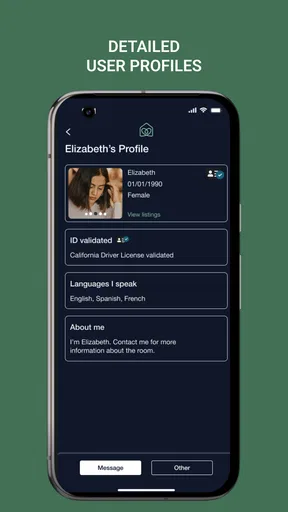
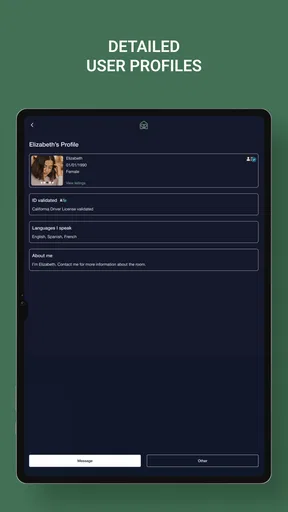
Creating a profile is a piece of cake. You can sign up using your Facebook, Google, or email which saves a lot of hassle. Once you’re in, you can fill in details about yourself, what you’re looking for, and your preferences. This part is crucial because it’s how potential roommates will get to know you. I liked that you can add a bio and even link your social media profiles for a bit more transparency.
I would keep that profile useful rather than exhaustive. A short description of your likely move-in timing, daily routine, and the kind of household you hope to join gives someone more to work with than broad claims about being easygoing. At the same time, there’s no need to publish sensitive details just to appear trustworthy. Share enough to start a sensible conversation, then use direct questions and a viewing to assess whether the fit is real.
Finding a Room or Roommate
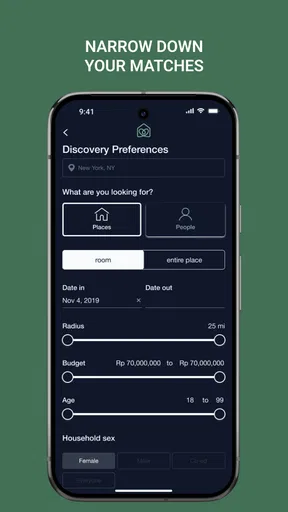
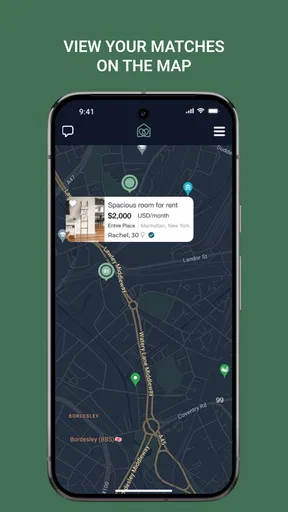
Searching for a spot is straightforward. You can set filters such as location, rent budget, and amenities, which really helps narrow down the options. One feature that stood out to me is the compatibility score. It’s like having a matchmaking service but for roommates. It checks your profile against others to see how well you might get along—pretty nifty if you ask me.
I’d use that score as a prompt for questions, not as a verdict. A compatibility signal can help surface people whose stated preferences appear to overlap with yours, but it cannot tell you whether the commute is realistic, whether the room is as pictured, or how bills are handled. Before getting attached to a match, compare the listing with your actual non-negotiables: total monthly cost, location, household expectations, and a move-in date that works for both sides.
Roomster is especially practical when your search has two possible routes: you can look for a room in an existing home, or advertise a space and look for someone to fill it. That makes it more relevant than a classifieds feed that only helps with one side of the arrangement. If you already have a place, a clear listing can do some of the early filtering for you; if you need a room, your profile helps explain what kind of household you are seeking.
Making a listing worth responding to
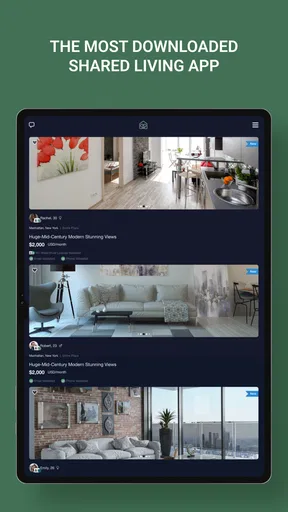
Posting a listing is just as easy. You can add photos, describe the place, and set your price. The app encourages honesty, which I think is a good nudge towards maintaining a trustworthy community. I noticed listings with detailed descriptions and clear photos tend to attract more attention, so that’s something to keep in mind if you’re posting.
A useful listing should answer the questions people usually need before they agree to visit. Explain which room is available, what shared spaces are like, and what sort of household routine a new person would be joining. Be precise about what the listed rent covers if you know it, and avoid making a photo do the work of a written description. This can reduce mismatched messages, although it cannot guarantee that every person who contacts you has read the details carefully.
Communication is Key
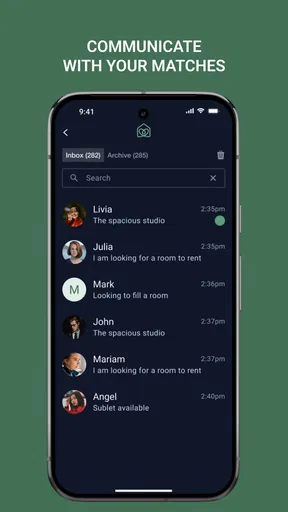
Roomster® offers an in-app messaging system, which I found super convenient. It keeps all your conversations in one place, so you’re not jumping between apps or emails. The messaging feature is straightforward, and you can easily set up a viewing or meet-and-greet to get a feel for the potential roommate. A little face-to-face time can make all the difference.
A realistic search might look like this: you spot a room that seems promising during a lunch break, save the key details in your notes, and message the poster with a few specific questions about availability, the household, and viewing times. If the answers are clear, you can arrange to see the space; if they stay vague or pressure you to commit before you have enough information, you can move on. Keeping early conversations in the app gives you one place to revisit the exchange while you compare options.
For a viewing, I’d bring a compact checklist rather than relying on first impressions. Confirm the room itself, ask how shared spaces are used, and make sure you understand the expected costs and next steps before agreeing to anything. A pleasant chat is a good sign, but it does not replace checking the actual living arrangement. Roomster can help establish contact; the final decision still calls for ordinary care and clear communication.
Safety and Trust
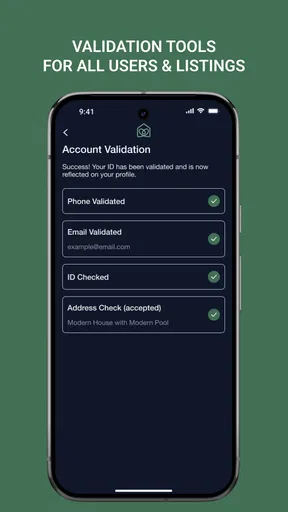
One thing I was a bit wary about was the safety aspect. Thankfully, the app has a verification process. Users can verify their profiles by linking social media accounts or providing ID verification. While it’s not foolproof, it does add an extra layer of security. Plus, you can see reviews and ratings from other users, which is a good indicator of someone’s reputation.
I would read those signals as one part of a check, not as proof that a listing or person is safe. Arrange an in-person viewing before making a commitment, tell someone you trust where you are going, and avoid sending money just because a conversation feels friendly or urgent. The same caution applies to your own profile: linking a social account may help someone get a sense of who you are, but it also means sharing more about yourself. Choose the level of disclosure you are comfortable with.
Subscription Plans
Here’s where it gets a bit tricky. While the app is free to download and use, some features are locked behind a subscription. To access certain premium features like unlimited messaging, you might need to shell out a bit of cash. It’s a bit of a downer, but I guess it’s the norm with most apps these days.
That paywall is an important practical trade-off if you are trying to move quickly. Before paying, I’d check what the free version lets you do and whether the paid access addresses the specific bottleneck you are facing. If you are still refining your search area or only browsing casually, a subscription may be premature. If you have a firm deadline and are already finding relevant listings, paying could be easier to justify—but I would decide based on your own budget and the options presented in the app, not on the assumption that payment guarantees a room or a compatible roommate.
Who will get the most out of it
I can see Roomster working best for someone moving to a new neighborhood, looking for a room in a shared home, or trying to find a housemate for a space they already have. It is also useful for people who want one place to browse both people and rooms instead of starting with only a property search. A student or a worker relocating on a tight schedule may appreciate having filters and profile details available before arranging conversations, provided they still verify the practical details offline.
It is less suited to someone who wants a fully hands-off rental process or expects the app to guarantee the legitimacy of every post. If your priority is a formal lease process, a verified property-management channel or a local rental professional may be a better starting point. If you already have a trusted network in the area, asking friends or colleagues can also be more direct and may give you context that a profile cannot. Roomster is most useful when you need to widen the pool of possible matches, not when you want to skip due diligence.
How it compares with other ways to search
Compared with broad classifieds, Roomster’s roommate-focused profiles and compatibility signal make the people side of the search more visible. That can help when you care about household fit as much as rent. The trade-off is that a matching score and an organized profile still depend on what users choose to enter; they are not a guarantee of an accurate description or a good living arrangement.
Compared with asking around locally, the app can expose you to people beyond your immediate circle, but it lacks the personal context a mutual friend might provide. Compared with a property-first rental service, it is more centered on shared living and direct roommate contact, rather than only helping someone find a whole apartment. I would use the channel that best fits the problem: Roomster for expanding roommate and room leads, a conventional rental route for a full-property search, and personal referrals when trust and local knowledge matter most.
What has changed, and what existing users should expect
Roomster was released on March 15, 2016, and its current Android version is 1.1.088. Those details show that this is an established app with a continuing version history, but they do not by themselves tell me which features have changed over time. For someone who has used it before, the practical approach is to check the current screens and terms in the installed app rather than assume an older walkthrough still matches every detail.
The core purpose remains clear in the way the app is presented: finding rooms and potential roommates. That continuity is helpful for returning users who want to pick up a search, but any app that changes over time can adjust how particular tools or paid options work. I would review the current messaging access and purchase choices before planning a time-sensitive search around them. The main thing to watch is whether the current version supports your actual workflow without creating friction at the point when you need to contact a promising person.
Where I would be cautious
The biggest limitation is not a single missing tool; it is the gap between discovering a promising lead and confirming that the arrangement is right. Search filters can narrow options, profiles can begin a conversation, and reviews can add context, but none of them settle questions about the room’s condition, household expectations, or the terms of an agreement. That means the app can save time at the discovery stage while still leaving meaningful work for you to do.
The mixed average rating is another reason I would go in with measured expectations rather than assume every search will be seamless. A person’s experience can depend on their location, timing, the quality of available posts, and how much contact they need to make. If your search is urgent, I would not rely on a single app: use Roomster alongside a suitable local alternative and keep your requirements clear so you can compare leads consistently.
Roomster is free to install, and its Everyone age rating makes its intended audience broad, but housing conversations are still adult decisions that deserve care. I would not treat a profile badge, compatibility score, or positive review as a substitute for verifying identity, seeing the property, and agreeing on costs in clear terms. Those checks are not a reason to avoid the app; they are simply part of using a roommate platform sensibly.
Final Thoughts
Overall, my experience with Roomster® was pretty positive. It’s user-friendly, packed with useful features, and seems to foster a community of trust. Sure, the subscription aspect might be a bummer for some, but if you’re serious about finding a place or a roommate, it could be worth the investment.
Would I recommend it? Absolutely, especially if you’re tired of sifting through sketchy Craigslist ads. Roomster® might just be the ticket to finding your next home sweet home or that perfect roomie.
I would recommend it as a practical way to broaden a roommate search, especially when you want to compare rooms and people in the same place. I would not recommend treating it as a shortcut around viewing a property, checking the details, or deciding whether the paid options fit your budget. Start with a clear profile and realistic filters, ask pointed questions, and keep a backup search route open. Used that way, Roomster can be a helpful lead-finder; the final call about where and with whom to live remains yours.
Verdict
Strengths of Roomster® 5M+Downloads
- User-friendly interface for easy navigation.
- Extensive property listings worldwide.
- Advanced search filters for precise results.
- Secure communication between users.
- Regular updates with new features.
Limitations of Roomster® 5M+Downloads
- Subscription required for full access.
- Limited free features available.
- Some listings may lack detailed info.
- Occasional app glitches reported.
- Customer support can be slow.
Similar Picks in This Category
View All
SmartThings
Samsung Electronics Co., Ltd.4.6

Google Home
Google LLC4.0

Pinterest4.2

Astrotalk - Talk to Astrologer
Astrology & Horoscope4.7

My Verizon
Verizon Consumer Group4.5

Samsung Wallet (Samsung Pay)
Samsung Electronics Co., Ltd.4.1
Frequently Asked Questions
What is Roomster and how does it work?
Roomster is a platform designed to help users find roommates and shared accommodations globally. It connects users who are looking to rent out rooms or find room rentals. Through the app, users can create profiles, list preferences, and communicate with potential roommates, making the process of finding a suitable living situation easier and more efficient.
Is Roomster free to use, or are there any subscription fees?
While Roomster is free to download and allows users to browse listings and create profiles, certain features require a subscription. This includes full access to communication tools and advanced search filters. Subscription options vary, so it's important to check the app for current pricing and features available under each plan.
How does Roomster ensure the safety and authenticity of listings?
Roomster employs various measures to ensure the safety and authenticity of listings. Users are encouraged to verify their profiles through social media and email. Additionally, Roomster uses a reporting system for users to flag suspicious activities or listings. However, users should still exercise caution and conduct their own due diligence when interacting on the platform.
Can I use Roomster globally, and in which languages is it available?
Yes, Roomster is a global platform, allowing users to find roommates and accommodations in various countries worldwide. The app is available in multiple languages, including English, Spanish, French, and more, making it accessible to a diverse user base. Be sure to check the app for the most current language offerings.
What features does Roomster offer to enhance user experience?
Roomster offers a variety of features to enhance user experience, including advanced search filters, profile customization, and the ability to save favorite listings. The app also allows users to connect through messaging, making communication straightforward. Additionally, Roomster frequently updates its interface for a user-friendly experience, ensuring easy navigation and functionality.
